Keyboard Symbols:
Names, Meanings and How to Type Them
Nine symbols, each with its history, uses, and typing steps
Find the name of any keyboard symbol, learn what it means in writing, math, and code, and see how to type it on Windows, Mac, phones, and keyboards of other countries.
Every key on a keyboard has a name, a history, and a job, and many of them do more than one job. The slash that separates a web address is not the slash in a date, and the pound sign of an American phone is the hash of a British programmer. This series gives each symbol its own page, with the names that people search for, the code points, the uses in writing and in computing, the rules of style, and the steps for typing it. The most visited page of the site, on the backslash, is part of the series.
Where the symbols are
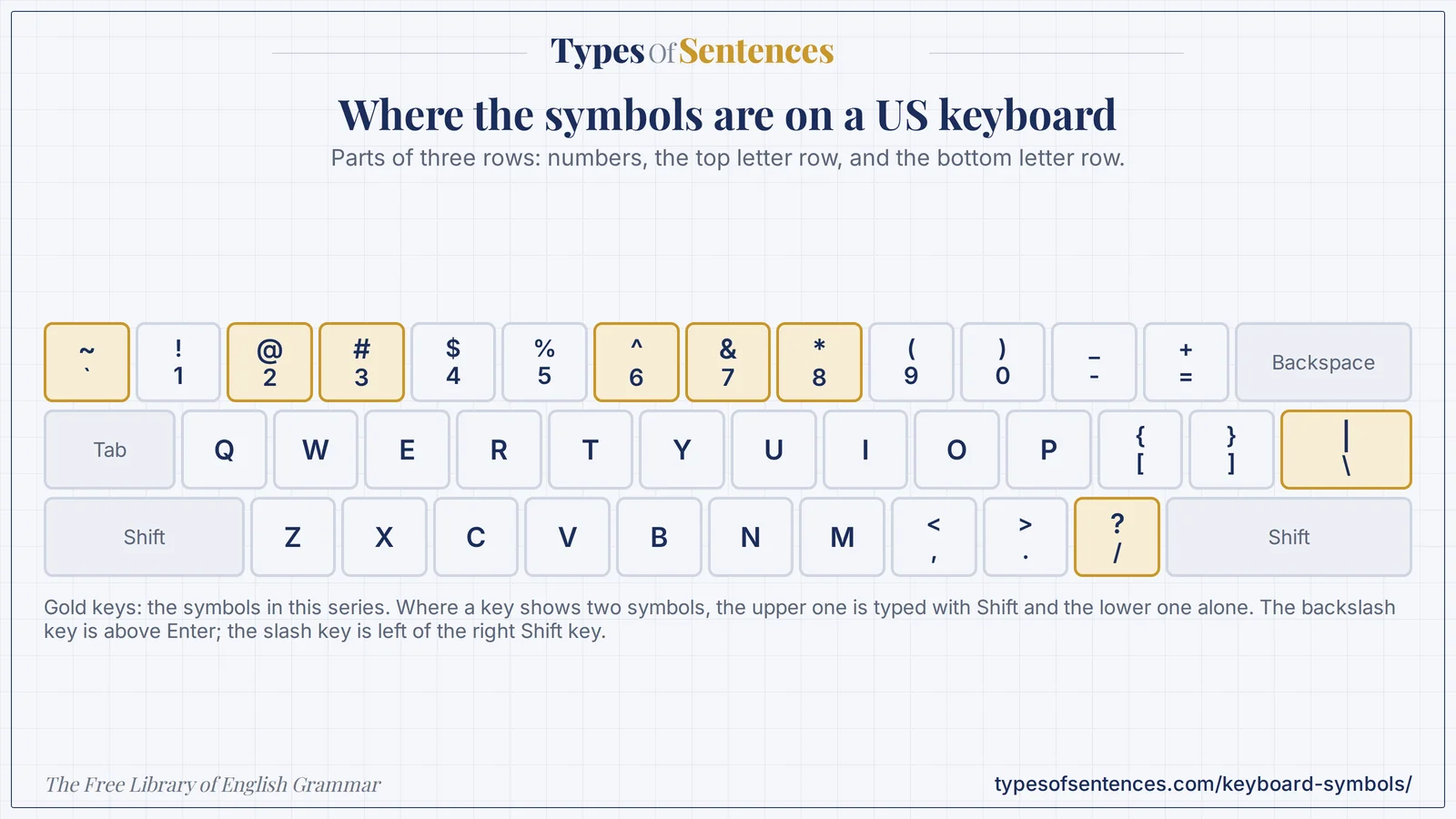
The nine symbols
Names, codes, and keys at a glance
| Symbol | Name | Unicode | ASCII | US keyboard | Windows Alt code |
|---|---|---|---|---|---|
| \ | Backslash | U+005C | 92 | the key above Enter (no Shift) | Alt + 92 |
| / | Forward slash | U+002F | 47 | the key left of the right Shift key | Alt + 47 |
| | | Pipe | U+007C | 124 | Shift + the backslash key | Alt + 124 |
| ~ | Tilde | U+007E | 126 | Shift + the key left of 1 | Alt + 126 |
| & | Ampersand | U+0026 | 38 | Shift + 7 | Alt + 38 |
| * | Asterisk | U+002A | 42 | Shift + 8 | Alt + 42 |
| ^ | Caret | U+005E | 94 | Shift + 6 | Alt + 94 |
| # | Pound sign | U+0023 | 35 | Shift + 3 | Alt + 35 |
| @ | At sign | U+0040 | 64 | Shift + 2 | Alt + 64 |
The codes are those of the Unicode Standard and of ASCII; the keys are those of a US keyboard. Layouts of other countries differ, and each guide lists the common ones.
How to type a symbol on any device
| Device or system | How to type a symbol |
|---|---|
| Windows | hold Alt and type the code on the numeric keypad with Num Lock on (for example Alt + 64 for @) |
| Mac | the same keys as on a US keyboard, with Shift or Option; check the Keyboard Viewer for other layouts |
| iPhone and iPad | tap 123 for numbers and symbols, then #+= for more |
| Android | tap ?123, then the second symbols page |
| keyboards of other countries | some symbols need AltGr or a different key; each guide gives the common layouts |
| web pages (HTML) | write an entity such as & for the ampersand or @ for @ |
| copy and paste | select the symbol on its guide and copy it |
If a key gives a different character from the one printed on it, the keyboard layout or input language is probably set to another country: switch it to match the keyboard. The grammar of technology terms, including the way that names of symbols and keys are written, is described in the chapter on grammar and technology.
Which of these are marks of punctuation?
Only a few of the nine are punctuation in ordinary English: the slash (in and/or and in poetry), the ampersand (in names and some citations), and the asterisk (for notes). The others belong to computing, mathematics, and social media. The marks that every writer uses are explained in the chapters on punctuation, punctuation marks, and advanced punctuation, and the typography of symbols in the chapter on typography and grammar.
Recap in 12 seconds
Watch the lesson build itself: The nine symbols on a US keyboard. The video has no sound.